Choose an upload mode
Choose ZIP or PROJECT packaging and configure project-root handling for reliable, repeatable submissions.
Updated 2026-08-04
Both modes trace scene dependencies. They differ in remote storage and in what a later submission can reuse.
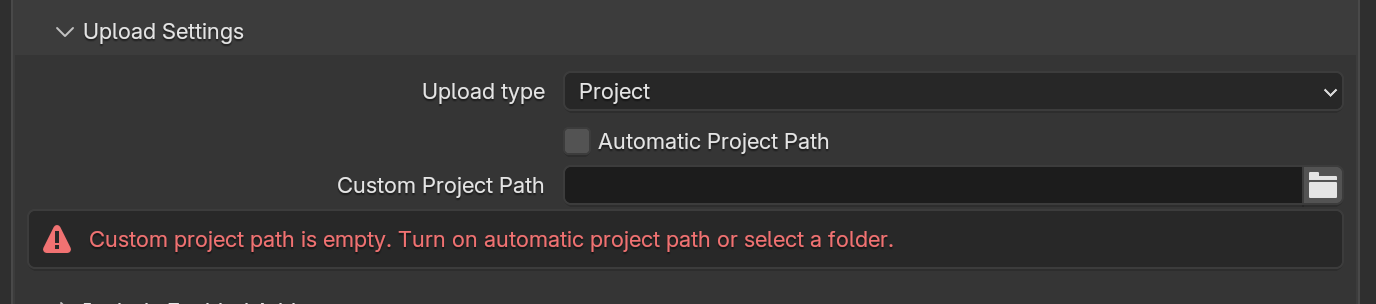
*PROJECT adds reusable synchronization and common-root path boundaries. Path warnings block submission until resolved.*
ZIP: self-contained by default
ZIP packages the .blend and discovered dependencies into one archive for the job.
Choose ZIP when:
- this is the first test of a scene
- assets live outside one clean project root
- dependencies span multiple drives or volumes
- portability matters more than incremental upload speed
- you need a simple fallback after a PROJECT path warning
Every new submission re-uploads the full archive, even when little changed.
PROJECT: incremental reuse
PROJECT uploads files into the selected project's isolated remote area. Later submissions send only new or changed data.
Choose PROJECT when:
- shots share a stable project directory
- submissions reuse large assets
- dependencies can map under a common root
- the time saved on repeat uploads outweighs the initial structure work
PROJECT has path boundaries
The trace can exclude dependencies with absolute paths outside the project root and dependencies on another drive. Make those paths relative, move the assets beneath the root, or switch to ZIP.
Automatic project path
Automatic Project Path inspects the saved file and its dependencies and picks a usable common root. The panel shows a dependency summary and warns when files do not fit.
It works best when the .blend and assets already live beneath a deliberate production folder.
Custom project path
Disable Automatic Project Path to choose the root yourself. The custom root should:
- be an ancestor of the submitted
.blend - contain the dependencies that should be reusable
- stay stable between related submissions
- not rely on drive-relative mapping across separate volumes
Too narrow excludes sibling folders. Too broad drags in a huge tree.
Decision guide
| Scene layout | Recommended starting point |
|---|---|
| One-off scene or first remote test | ZIP |
| Assets scattered across folders or drives | ZIP, then reorganize if repeat uploads matter |
| Episodic or shot-based work under one production root | PROJECT |
| Large shared texture/cache library under the same root | PROJECT |
| PROJECT scan reports excluded dependencies | Fix paths or use ZIP |
Relative paths are mode-specific advice
Use relative asset paths for PROJECT. ZIP packages a self-contained set and does not require them.
Reliable project structure
my-production/
├── shots/
│   ├── shot-010.blend
│   └── shot-020.blend
├── assets/
│   ├── textures/
│   ├── linked-blends/
│   └── caches/
└── color/
Use Blender's path tools to make eligible file references relative to this root. After moving assets, reopen the scene, check for missing paths, render locally, and submit one remote test frame.
- Dependencies: Review asset classes, render-time add-ons, and validation steps.
- Troubleshoot an upload: Interpret path warnings and jobs that never register.