Previews, outputs, and retention
Distinguish web previews from original render output, download safely through Blender, and plan around current retention.
Updated 2026-08-04
Superluminal shows two kinds of image: fast web previews for review, and the original render files you deliver.
Preview versus original
| Place | Purpose | Use for final delivery? |
|---|---|---|
| Web frame grid and player | Fast status, composition, motion, layer, and error review. | No. Previews are optimized derivatives. |
| Blender Manage & Download | Transfer the original completed render objects. | Yes, after local validation. |
A preview shows one selected layer, pass, camera, or output, and can arrive after the full render object. A missing preview does not prove the original is missing. Check job state and logs.
Multilayer and additional outputs
Multilayer OpenEXR, multiple view layers, cameras, and compositor file-output nodes can produce several items per frame. Choose the expected layer in the web app. After download, inspect the originals in software that understands the format and layer structure.
Download from Blender
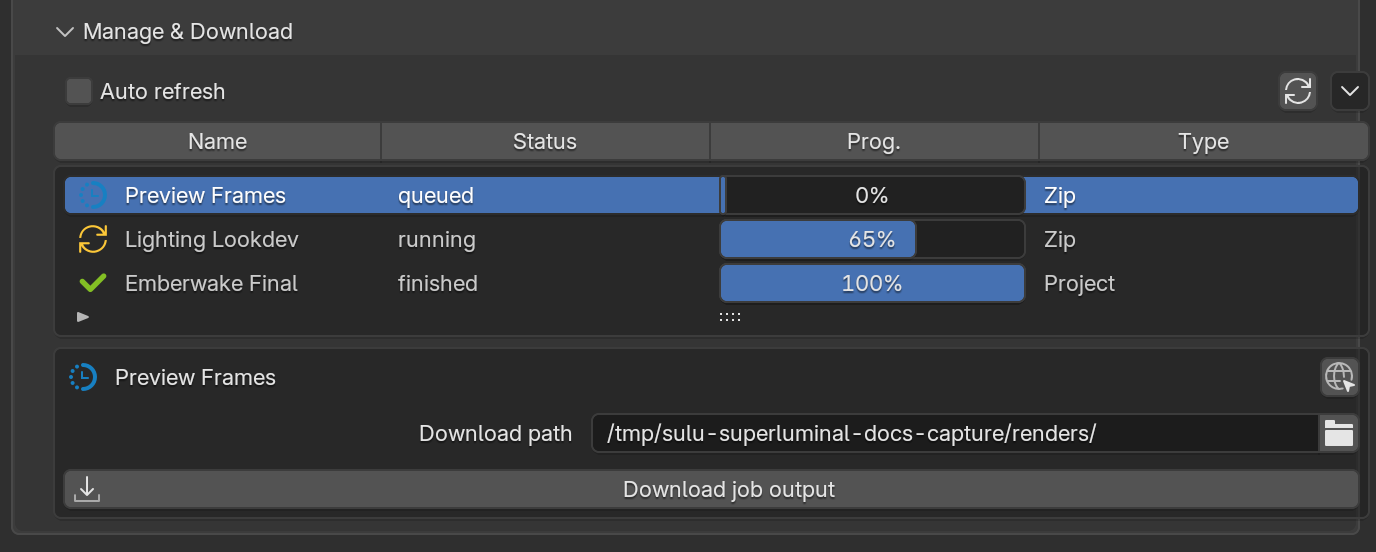
*Manage & Download in the add-on: pick the job, pick a folder, download the original frames.*
Download originals through the add-on's Manage & Download section. Transfers can start before the job finishes, resume safely, and pick up re-rendered frames. The walkthrough, the download terminal, and safe habits live in Manage & Download.
Seven-day render-object retention
The farm currently keeps render objects for seven days. Treat it as a render and transfer service, not an archive.
Keep a durable copy
Download, verify, and back up production output before the retention window expires. A future Storage product is visible as a preview. Do not use it as the archive for render output yet.
Verification checklist
- Expected frame numbers and step are present.
- Image dimensions, format, channels, layers, and color interpretation are correct.
- File-output-node and multi-camera results are accounted for.
- Rerendered frames replaced the intended local versions.
- A checksum, asset-management system, or spot review confirms the durable copy.
- The production backup is separate from the add-on's download folder when the workstation is not itself backed up.
- Manage & Download: Use the add-on's live polling and resume behavior.
- Job details: Review layers, frame state, settings, and logs before transfer.
- Availability: Understand the current Storage preview boundary.