Cycles on a render farm
By Superluminal Engineering
Superluminal recorded the shortest render pipeline for all three Cycles scenes. Thirty nodes completed the Classroom render pipeline in 90.5 seconds.
Published 2026-07-29 · Updated 2026-08-06
- Classroom, 30 nodes
- 90.5 seconds
- Junk Shop, 30 nodes
- 64.5 seconds
- Monster, 30 nodes
- 59.9 seconds
- Scaling result
- 4.5× faster with 6× the nodes
Fastest recorded render pipeline.
Fastest recorded render pipeline.
Fastest recorded render pipeline.
The Classroom render pipeline fell from 411.0 to 90.5 seconds.
Cycles is Blender's physically based path tracer, and each sample traces light through a scene to form the final image. More samples can reduce noise but increase render time, which makes independent animation frames a good fit for parallel rendering on a farm.
Measured Cycles results
Our 2026 Blender render farm benchmark used Classroom, Junk Shop, and Monster Under the Bed. Superluminal recorded the shortest render pipeline for all three Cycles scenes.
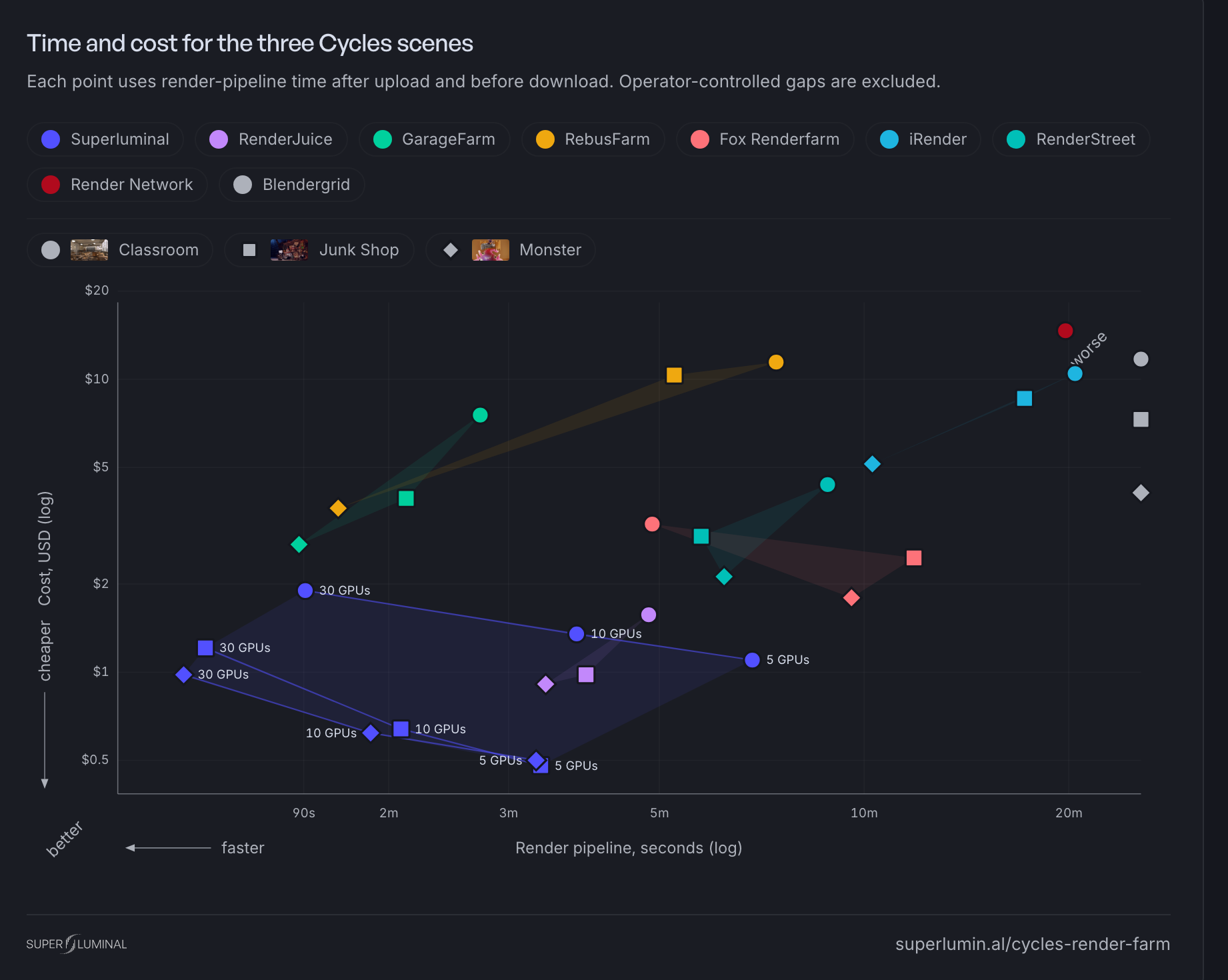
With 30 nodes, Classroom took 90.5 seconds, Junk Shop 64.5, and Monster 59.9. The margin was not close in any scene. The plot below includes the three Cycles scenes.
Time and cost for the three Cycles scenes
Each point uses render-pipeline time after upload and before download. Operator-controlled gaps are excluded.
More nodes cannot split one frame (yet)
The current farm assigns a complete frame to one node. Adding nodes lets more frames render at once, but it does not make one still image render across several nodes yet.
We are working on that limit. For current animation jobs, node count helps until the remaining frame count falls below the available nodes.
On Classroom, six times the nodes made the job 4.5 times faster, not six times. The speed study shows where the missing speedup goes.
One frame must fit one node
A frame renders on one node, so the whole scene must fit that node's GPU memory. Some Cycles configurations can use system memory after GPU memory fills. That fallback can slow rendering, and a larger scene can still fail. Test the frame with the highest expected memory use before submitting a long sequence.
The Blender render farm explainer covers this constraint for every engine.
The Persistence Engine reuses Blender between frames
The Persistence Engine can keep Blender open after a node finishes a frame. The node changes the frame number and output path, then starts the next frame without launching Blender and opening the project again.
Every frame can use this path. The engine saves the most time when Blender startup and scene construction form a large share of each frame. Long frames still avoid the repeated work.
Persistence can expose scene or add-on behavior that expects a fresh process. If a short comparison produces different output, use the render node settings guide to test the job with the Persistence Engine disabled.
When a Cycles farm is useful
A farm helps most when many finished frames matter more than immediate interaction. It is less useful during active look development or for one still that fits on your workstation.
For animation, submitting from Blender also keeps dependency checks and job settings next to the scene. Finished frames can return while later frames render, which shortens the wait before review.