Blender render farm
By Superluminal Engineering
A Blender render farm renders separate animation frames on many computers at once. The project, its dependencies, and each frame must work on every node.
Published 2026-07-29 · Updated 2026-08-08
- Benchmark scope
- 43 recorded runs
- Superluminal test range
- $0.48 to $1.90
- Project packaging
- Files checked before upload
- Output delivery
- Finished frames download during rendering
Nine services rendered four standard Blender scenes.
Reconciled charges for 12 completed benchmark jobs.
The add-on names missing and unreadable files before rendering starts.
When Download as frames finish is enabled, completed originals move to local storage while later frames render.
A Blender render farm is a group of computers that renders one project by assigning different animation frames to separate workers, called nodes. A 100-frame animation at five minutes per frame takes 8 hours and 20 minutes on one computer. A farm renders many frames at once.
How a render farm splits an animation
Each animation frame is an independent image, so a node can start frame 42 before another node finishes frame 41. More nodes reduce the wait until only the final group of frames remains.
Simulations and temporal effects are the main exception. Bake cloth, fluids, particles, Geometry Nodes simulations, and other sequential caches before submission so every node reads the same state.
Upload, queueing, Blender startup, and unequal frame times also limit the gain. The speed study shows how Superluminal removes time around the render instead of relying on more nodes alone.
What every render node needs
A .blend file stores scene data, but it can reference textures, HDRIs, linked libraries, fonts, video, and caches elsewhere. A farm must receive those files with the project or Blender can produce missing textures, static simulations, or incomplete frames.
Each node also needs the correct Blender version, render engine, add-ons, output format, and scene settings. See Blender project dependencies, render engine compatibility, and add-on support.
One frame must fit on one node. Adding nodes gives the animation more GPU memory in total, but it does not combine that memory for a single frame. Large geometry, textures, and volumes can still exceed one node's memory.
Cycles and EEVEE create different farm workloads
Cycles often spends minutes tracing each frame, so parallel rendering can remove a large part of the wait. EEVEE can finish frames much faster, which makes startup and file transfer a larger share of the job.
The useful node count therefore depends on the scene, frame count, and frame-time spread. A test job gives you a better estimate than the local time for one convenient frame.
Why submit from Blender
Submitting from Blender lets the Superluminal add-on inspect the project you already have open. It checks file references before upload and names missing files, unreadable files, absolute paths, and files on another drive.
The add-on packages the project and sends the job. No settings rebuilt in a separate uploader. You keep working in Blender, follow submission progress, and download original outputs as frames finish.
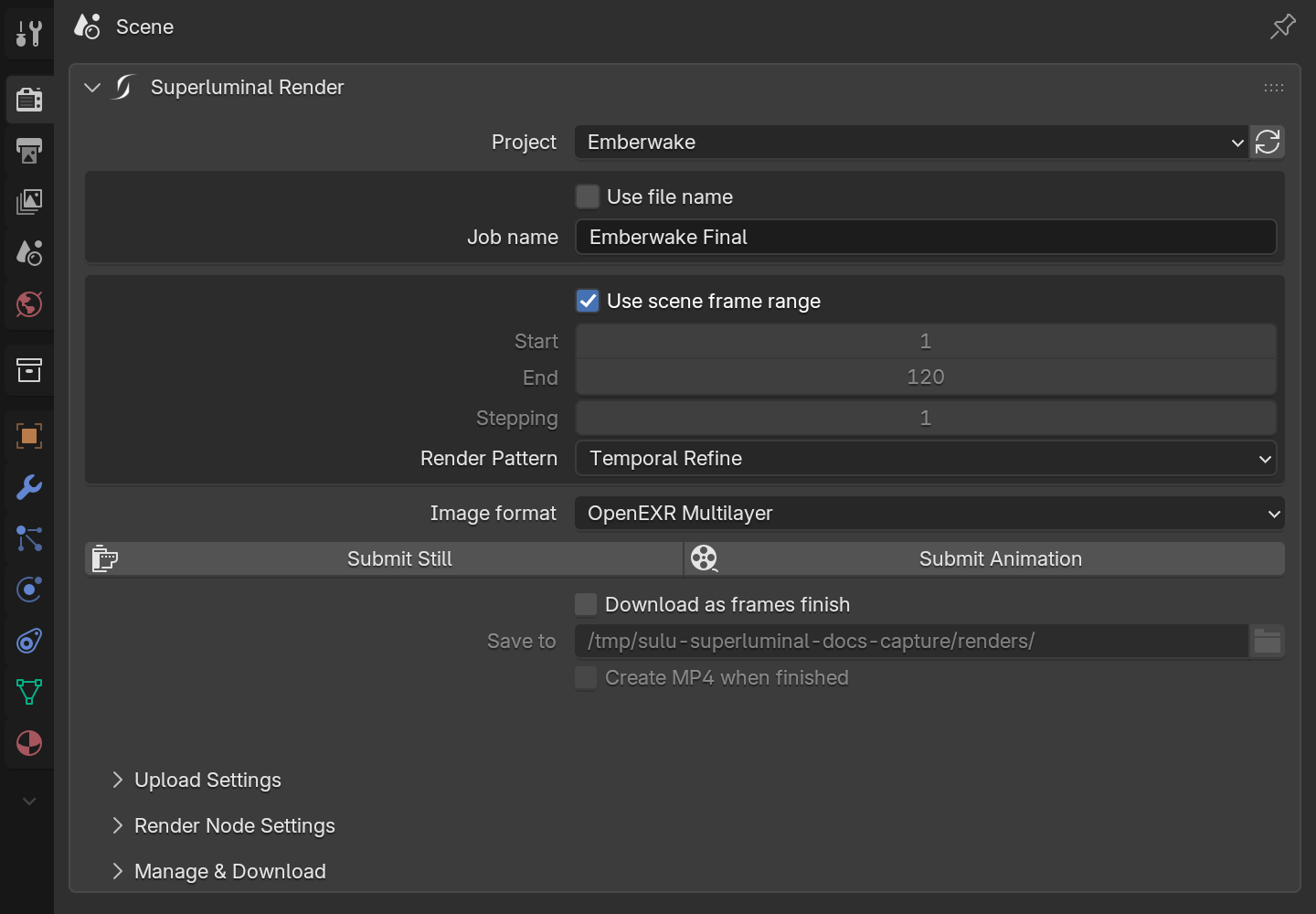
The first-render guide covers account setup. The job submission guide explains each control.
Measured render time and cost
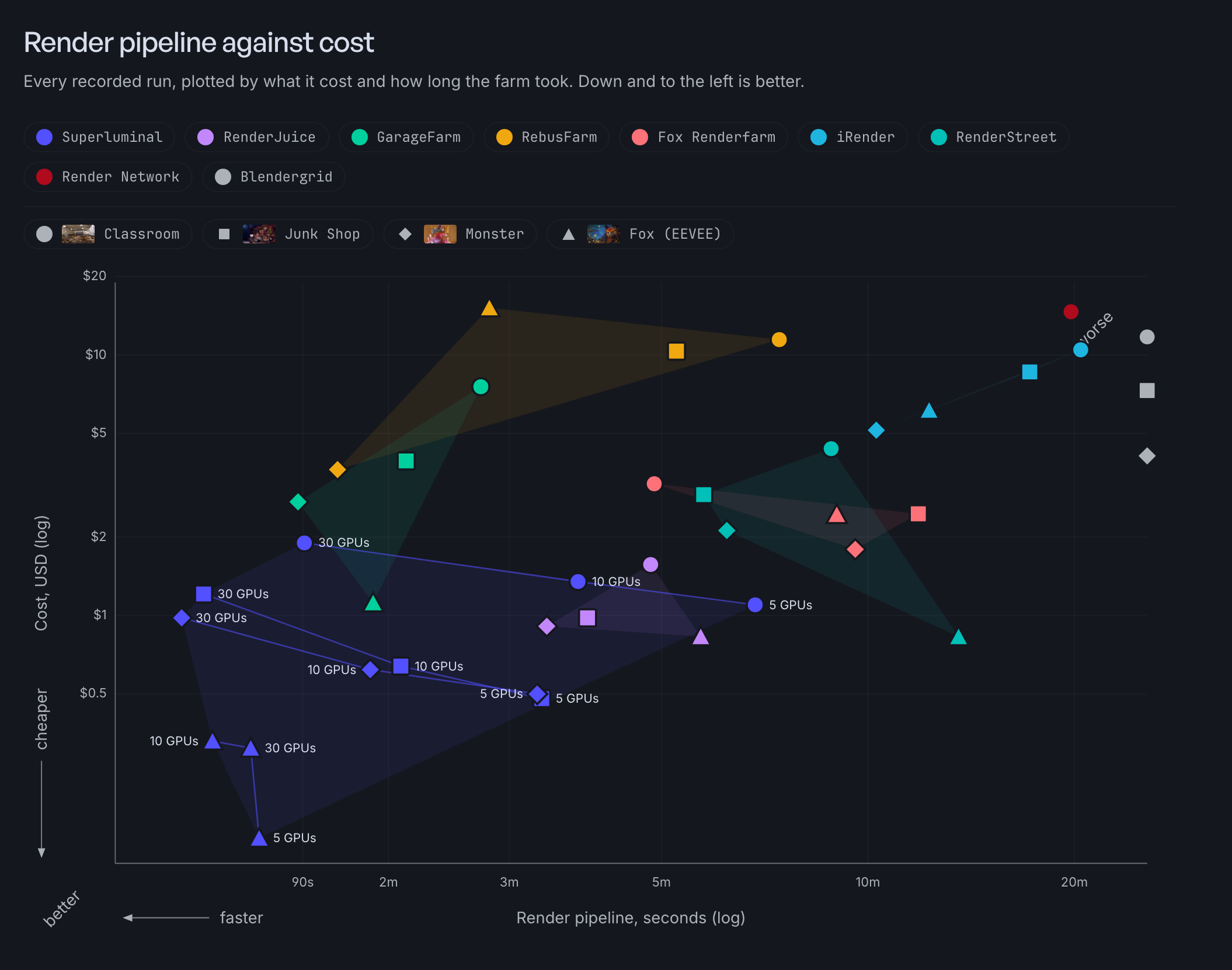
Our 2026 Blender render farm benchmark recorded 43 runs across nine services and four scenes. Superluminal delivered the complete local output first and recorded the shortest render pipeline in all four scenes.
The render pipeline is the benchmark's clock for the farm itself. It runs from the moment a service starts working on the job until the service reports the render finished, so it includes analysis, queueing, startup, and retries, not just rendering. The 12 Superluminal jobs cost from $0.14 to $1.90, or $9.56 combined. All 12 together cost less than one competitor's displayed quote for a single scene.
Render-pipeline time and cost across recorded runs
Each point excludes upload, download, and operator-controlled gaps. Lower and farther left means a lower qualified cost and less provider-pipeline time.
Finished frames should arrive during the render
The job page shows completed frames, render layers, timing, and logs. The Blender add-on can download original files while other nodes continue to render, so review and compositing can start before the full sequence ends.
See live previews and manage and download jobs.